Wednesday, December 18, 2019

Amazon Queus with Ballerina

Ballerina and it's Connectors

Ballerina is a general purpose programming language designed for system integration. Web Services and REST APIs can be integrated with Ballerina code. WSO2 Ballerina Integrator, supports many out of the box components, called Ballerina Connectors, to programatically integrate external services and APIs. For example, when you want to connect to a Salesforce API, you can import the Salesforce Connector module to the Ballerina code and call its methods to the relevant REST API provided by Salesforce.

Amazon Simple Queue Service (SQS)

Amazon SQS is a simple message queue API provided by Amazon. WSO2 Enterprise Integrator (WSO2 EI) provides Ballerina Amazon SQS Connector  to programatically interact with the REST API provided by Amazon SQS. Once you have created an account in Amazon SQS, you can get the credentials for SQS service, which can be given to the Ballerina Connector as a configuration file or as configuration parameters. Then you can perform queue creation, enqueue, dequeue and message-delete operations by calling the respective API methods provided by the Connector.

Using SQS Connector

In this blog I am going to discuss the simplest way to run a Ballerina code with Amazon SQS Connector in Ubuntu/Linux console to create a SQS queue and send a message into it. For more information on usage of Ballerina Integrator with SQS connector with VS Code Plugin please visit the relevant tutorial documentation.

Setting up Ballerina Environment


Go to the WSO2 Ballerina Integrator download page.
Download the WSO2 Ballerina Integrator with Download button and install it.
Check whether Ballerina is correctly installed in your machine by executing the following command.

$ ballerina -v

If the Ballerina integrator is correctly installed in your machine you will get the following output.

Ballerina 1.0.2
Language specification 2019R3

Start developing Ballerina Code


Go to the directory location you want to make the Ballerina code.

$ cd loc

Create a Ballerina file.

touch sqs.bal

Open the file with your preferred editor.

gedit sqs.bal &

Add the following content to start the coding.

import ballerina/log;
import wso2/amazonsqs;

public function main(string... args) {

}

Note how the Ballerina console logging module and Amazon SQS Connector module is imported into the code. The main function is the program entry point as many other languages. Anyway this code snippet will not yet build as these imports are not used in the code.

Defining SQS Configurations and Client


Now let's define the Amazon SQS Configuration object and the SQS Connector client object above the main method.

amazonsqs:Configuration configuration = {
    accessKey: "Access Key",
    secretKey: "Secret Access Key",
    region: "Region",
    accountNumber: ""
};

amazonsqs:Client sqsClient = new(configuration);

Replace the Access Key, Secret Access Key and the Region parameters with the credentials obtained from the Amazon SQS account creation stage. Then you can create a SQS queue manually and you can get the  parameter from the path of the queue path generated.

Create a Standard Queue in Amazon SQS


There are 2 types of queues defined in Amazon SQS, Standard and FIFO. In this example we are going to create a Amazon Standard Queue. In order to do that we invoke the sqsClient as follows by adding the following code in the main method.

string|error queueURL = sqsClient->createQueue("myNewQueue", {});

if (queueURL is string) {
    log:printInfo("Created queue URL: " + queueURL);
} else {
    log:printInfo("Error occurred while creating a queue");
}

If the queue creation process had encountered an error, the queueURL would become an error object and a string type otherwise. The string would be the queue URL as specified in the documentation

If the queue was created the queue URL would be printed something like https://sqs.us-east-2.amazonaws.com/613964236299/myNewQueue. Note the format of the URL.

https://<Region>.amazonaws.com/<Access_Key>/<Queue_Name>

Enqueue a Message to an SQS Queue


Once an SQS queue is created a message can be stored in the queue. Invoking the sendMessage in the connector would send a message into the queue. Note that the received queue context path /<Access_Key>/<Queue_Name> has to be used for accessing the queue.


amazonsqs:OutboundMessage|error response = sqsClient->sendMessage("Sample text message.", "/613964236299/myNewQueue", {});

if (response is amazonsqs:OutboundMessage) {
    log:printInfo("Sent message to SQS. MessageID: " + response.messageId);
}

If the above message sending got successful you would get a console output similar to the following.

Sent message to SQS. MessageID: 7e7511a4-68f6-4c94-98e7-2b1e30301a0b

The complete code used would look like following.

import ballerina/log;
import wso2/amazonsqs;

amazonsqs:Configuration configuration = {
    accessKey: "AKZAY3QCLPL7DE5YSNC3",
    secretKey: "r0RYhP0lputX6hiYvcB5VK7hiY+Id+rUI57b7Qjp",
    region: "us-east-2",
    accountNumber: "613964236299"
};

amazonsqs:Client sqsClient = new(configuration);

public function main(string... args) {
    string|error queueURL = sqsClient->createQueue("myNewQueue", {});

    if (queueURL is string) {
        log:printInfo("Created queue URL: " + queueURL);

amazonsqs:OutboundMessage|error response = sqsClient->sendMessage("Sample text message.", "/613964236299/myNewQueue", {});

if (response is amazonsqs:OutboundMessage) {
    log:printInfo("Sent message to SQS. MessageID: " + response.messageId);
}

    } else {
        log:printInfo("Error occurred while creating a queue");
    }

}


Friday, August 23, 2019

From ESB to Ballerina

Introduction to Conventional ESB

The main slogan for ESB was the ability to configure a process flow models in Enterprise mediation scenarios without using a programming language. As majority of integration requirement scenarios (e.g.: Content Based Routing, Message Transformation) can be modeled with a set of XML tags, it was expected to be used by lay people to write their own business logic without any programming skill. This positioning is common to almost all ESBs currently available in the market like Oracle ESB, IBM Integration Bus and Mulesoft ESB.

How it was like The Real Marriage with Conventional ESBs?


Though it was believed to be useful to configure a XML for mediation, the content to be written was verbose and lengthy to configure. Once a problem is detected in a XML configuration it took much time to fix, as the process is involved with reading documentation and needed some trial-and-error configurations to come up with the correct configuration. As more and more configurable parameters were added to each of the XML component, the readability and the configurability was reduced significantly with the maturity of the ESB. Then the question was why a simple programming code would not be able to replace the lengthy XML configurations.
Another trend came up with time was the Micro Service Architecture. As the services are to be spread across several lightweight containers, the conventional ESBs faced the challenge of deploying artifacts with less up-time and with a less memory footprint. With the maturity of ESBs the code base was large and was consist of multiple layers of architecture that added less value compared to the cost involved. It was difficult to fulfill the lightweight requirement of the Microservice world with XML based SOAP mediation where REST and JSON became the mainstream.

Birth of Ballerina

WSO2 was thinking hard how to address the above issues with existing ESBs. Some proposed solutions were to develop a Java API for integration scenarios, replacing the XML configurations. However they have found that the flexibility given by an API would not be sufficient for some scenarios. And the acquisition of Java by a commercial organization introduced some fear of its existence in future as an opensource language where an API would tightly couple the integration with Java language. Another aspect was the unavoidable performance implication due to its inherent garbage collection where the modern integration is supposed to be so faster than data processing in convention.
The decision was to develop a programming language focused on integration, supporting cloud native capabilities by nature. Inspired by the programming based paradigm used for integration by Apache Camel, Ballerina was born. First version of the Ballerina language is running on Java Virtual Machine (JVM) which is known as JBallerina. Ballerina syntax is converted to the Java byte code which is running on top of JVM. This addressed most of the issues related to unavailability of libraries for Ballerina language, as Java library APIs can be wrapped with Ballerina, while providing the expected development environment for integration developers. Anyway, the future of the Ballerina is not limited to the JVM dependency. In future the there will be a language called nBallerina which would run on a different libraries and runtimes supporting heterogeneous language libraries.

My Programming Experience with Ballerina


At the moment I am involved in developing a Ballerina based integrator for WSO2 Enterprise Integrator (WSO2 EI). It will be the next generation of WSO2 Enterprise Integration, facilitating users to develop integration scenarios with Ballerina language. As the first step we are developing a set of Ballerina Connectors which are analogous to WSO2 ESB Connectors. There we develop connectors with Ballerina language 1.0.0 alpha. I have seen the XML based mediation used in similar cases where the development with Ballerina is much intuitive relative to them. With Ballerina I could easily use my programming knowledge in Java, JavaScript and Python as a transferable skill. It was far easier than I expected except some issues I faced with the VSCode development environment. VSCode plugin for Ballerina is under heavy development at the moment which is expected to solve most of the usability issues in it. In conventional Integration platforms which use XML as the configuration language (e.g.: Mulesoft, IBM Integration) are highly prone to errors when it comes to error handling and incompatibility across different mediators/connectors as the issues are not interactively communicated to the developer. That highly increase the development time compared to developing a general purpose code. Ballerina has correctly addressed that deficiency by making the error handling mandatory by design and providing code completion suggestions and snippet generation for commonly used scenarios. As Ballerina supports messages to be defined as types, many run time errors caused due to mismatch of message structures are avoided at the compiler phase.

Final Wrap up

With my previous experience developing in ESBs based on XML configurations I feel easier to develop with Ballerina for similar scenarios. I tried my best to convey my opinion on Ballerina minimizing my biases on Ballerina. I expect the enterprise integration paradigm based on configuration would be moved to simple programming based models like Ballerina in future.


Sunday, November 12, 2017

Stop Machine Learning and Start Machine Studying

Machine Learning at Present

In the field of AI (Artificial Intelligence) Machine Learning is the key concept used for achieving intelligent systems. In the machine learning, a learning model is developed and it is trained using a sample data set to create the intelligence. The performance of the system is dependent on the elegance of the design and the amount and relatedness of the data set. The model is designed to capture the existing knowledge specialized into the domain which facilitates fast learning and improved accuracy. Specialized knowledge is required to design good learning modals and in today, the focus is completely given on designing better modals to come up with better AI systems. So there are more and more papers written on new modals expecting with better AI performance. But unfortunately, still there are less significant Machine Learning systems designed by small startups other than by a data-rich technology giants like Google or Microsoft.

Limitation of Data Driven Learning

The real advantage with in machine learning for technology giants is the amount of available data. Google have almost all the information the general public knows in their data centers. Facebook has data about us more than we know about ourselves (due to forgetting). An ordinary organization or even a university cannot afford that much of data at all. On the other hand it takes a lot of computational resources (CPU power and time) to train a better machine learning system due to the following reasons.

  1. Scale of data used for training is large
  2. Learning rate slows down in most machine learning systems with amount of learning
It seems an ordinary technology company cannot afford the capabilities of AI to a giant company with such a higher volume of resources. But if we go back to humans, where we are imitating the intelligence to our mechanical systems, we see something different. We learn a lot of stuff by our own even in absence of such a high volume of data or with higher energy consumption.

How do Humans Learn?

When it comes to humans, we have a learning system of neural networks similar to Artificial Neural Networks (ANN). But it has a difference. We learn the reliable information sources (first source is mother then father, relatives, teachers, friends, books, Internet and etc.) first and then get the wisdom directly from these sources. That is also a recursive process. We first identify who we can trust and believe in them. Then we change our believes according to their inputs if the new believes are not largely contradicting with our existing belief system. In that process we gather other reliable sources and get wisdom directly from them as well in the same process. For example we starts to believe mother and then we believe that father is also reliable to believe and starts to believe what the father says. Another example is that we believe school teachers and read their recommended books and believe what the book says about reality. We start to evaluate the validity of a knowledge by evaluating the knowledge itself or the source of knowledge, only when that piece of knowledge is not contradicting with the existing knowledge. For example when a child reads the benefits of capitalism, who was living in a socialistic society, will try to evaluate the reliability of the new knowledge of capitalism versus the existing knowledge of socialism.

In this way humans gather the wisdom gathered by other people for a long term process of learning and studying, by simply believing on the information source. In reality we purely learn a very little by ourselves compared to the amount we learn by studying other information sources. That made it possible us to know about very risky and time consuming experiences like death and aging.

How Machines Can Learn?

Similar to the way we learn by first learning on the reliable information sources, machines can be modeled to identify reliable information sources by conventional machine learning. Then machine itself can refer the information from the source and start to change the behavior according to the information. That is a process of converting the information obtained from the reliable source into meta information of the learning modal. This process can be recursively executed and the system can learn a lot of knowledge within a very little amount of learning. That is pure studying. But how the machines can study like humans?

Read Like Humans

The main source of knowledge of humankind is already stored in form of natural language in books and in online content. Machines can first study what humans have learned up to now in the history by reading the text contents in natural languages.

Source: http://rtechnews.com/tech-science/new-software-makes-use-of-machine-studying-to-personalize-emails-3479

Role of NLP

But the problem is that machines are not capable of reading human languages to learn from books. That is the situation when Natural Language Processing (NLP) comes in to play. Machines can use the existing NLP modals to extract information from as logical information into the system. The remaining work is how the logical information gathered can be converted into the meta information of learning modal and run the system in a controlled scope of logical learning and decision making. Existing modals to evaluate source credibility of information can be re-used to identify the reliable knowledge sources and natural language translation technologies can be further used to enhance the scope of knowledge available to learn throughout the world.

Wednesday, November 8, 2017

Is AI Evil?

There is a heavy debate among technology giants whether the AI can become a threat to the existence of mankind when it becomes an Artificial Super Intelligence. (ASI) But the problem with this prediction is not knowing how the logic of a super intelligence would reason facts. Even humans cannot understand how we do reasoning in most cases. But when it comes to a super intelligence that is 1000000 or more times intelligent than humans how can we predict what would be their decision?

The problem is how a rational thinker would decide whether the humans would exist in this world or not. One argument is that humans are like a virus to the natural world (said by the agent to Morpheus  in movie, Matrix) and they should be eliminated. And then the question is whether the activity of humans cannot be considered as a natural process and tolerate it. Other argument is that the ultimate wisdom is thinking with heart and be friendly with humans. But then the question is why only the kindness should only be considered on humans but not on other living beings in the world. Humans are famous in killing and suppressing the other living beings on earth.

None of the above arguments can rationalize the value of existence of human beings nor it can rationalize the elimination of humans from earth. Then how can we find whether the AI could be evil or not?

First we can assume the AI is a mimicking technology of natural human way of thinking. Let's check whether that evil nature can be expected in humans. In real humans evilness is clearly visible. But it is not possible to become a threat to our existence. One reason is that the scope of power of a human is limited so that he cannot directly use a mass destruction weapon or similar method to kill other people. Others would stop him if that type of behavior is seen from a human being. But the ASI is so intelligent so it can tempt the humans well as it can think many steps ahead the human thinking. But anyway still there is a very small probability of a human being becoming a person with an intention to kill other humans. But why?

Human thinking and value system is programmed according to the genetic algorithm to preserve the genes of themselves. Even the wish of you and me to protect the human beings is a result of that bias. That is not the only bias humans have. Humans and other animals have many common biases like desire to food and sex and fear at destruction. All of them constitutes the basic vision of a human or an animal. We want to survive, protect our species and work for the well being of the human society. Our thinking is driven on the goals on achieving these goals. If AI is developed so that it has the same goals like us it will process information for the well being of humans. That is the simple answer.

As most modern AIs are based on Artificial Neural Networks (ANN), if they are originally developed with a similar neuronal architecture to the real human beings that embeds the evolutionary goals of human beings AIs will start to have a sense similar to humans. But remember, according to us, we and our species are the ones that should survive. If that bias is embedded into ANNs, it will also start to feel the existence of self and will start to protect their species. So before we mimic our neuronal architecture to ANNs we should identify the connections related to self and replace them with humans where the ANN should not have a self but instead humans replacing them. If the self is not replaced correctly with humans, it will correct the replacements we made by itself and become a much selfish personality which ultimately treats humans, like we treat cows and chicken.

Then the question is what if we would not mimic the neural networks of humans. Yes, then there would be no issue like that depending on the goals given to the system. One goal should be always be the goal of protecting the human species, human laws and human traditions. If the goal was something like building chairs (without the goals related to protecting humans) it would use all the possible ways to achieve the target. It will start to kill humans to get their lands to plant trees to get wood. Finally it will destroy all the humans in the world to make most number of chairs. Now you see the challenge. All the actions of AI will dependent on the basic goals of the AI. That is similar to the attitudes of human beings. Parents and adults plant attitudes in a child's mind that are good for the existence of consistence of the society. Actually that is only a part of it. Child's brain is automatically programmed to a certain extend to be aligned with these attitudes. Antisocial criminal children or people are killed by the society which would evolve the humans to maintain only the best attitudes in a society to exist. The same can be applied to ANNs. A set of ANNs themselves can be given a virtual society with agents representing human beings. When their attitudes are against the well beings of humans those ANNs should be eliminated. Running that process would select only the ANNs that has best suited to our human society. That is the time they should be taken outside from the virtual world and be used in the real world. And employing several such ANNs would protect us if one of them goes against us.

Thursday, December 31, 2015

Bye to 2015

After less than 2 hours there will be a new calendar year, 2016 be started which will be a beginning of this blog in a new way with different type of content. Stay tuned for a new type of blogging culture. :)

Sunday, March 2, 2014

ESB Performance Round 7.5

WSO2 has carried out a performance testing of latest ESB release, WSO2 ESB 4.8.1. In WSO2 ESB Performance Round 7.5 it compares WSO2 ESB 4.8.1 with other competitive ESB products, Mule ESB 3.4.0, Talend-SE 5.3.1 and UltraESB 2.0.0.

Basic observations are as follows.


Tuesday, July 16, 2013

How to Build WSO2 Code

Although WSO2 is open source many people were having problem with checking out the WSO2 source code and building WSO2 products. Here are the simple steps to do it.
Note that at the moment ongoing development happens inside the trunk with version 4.2.0 SNAPSHOT. Last released WSO2 code is located in branch version 4.1.0 with Carbon platform version 4.1.2.

Build the trunk


  1. Checkout Orbit from https://svn.wso2.org/repos/wso2/carbon/orbit/trunk/
  2. Checkout Kernel from https://svn.wso2.org/repos/wso2/carbon/kernel/trunk/
  3. Checkout Platform from https://svn.wso2.org/repos/wso2/carbon/platform/trunk/
  4. Install Apache Maven 3 in your computer.
  5. Go to the checked out directories and build with Maven of orbit, kernel and platform code respectively. (Use command, mvn clean install)
  6. If any errors comes with tests use the command mvn clean install -Dmaven.test.skip=true
  7. If the build is properly building and you are fortunate you will get all the products as zip files in each product. For example WSO2 BAM will be there in platform/trunk/products/bam/modules/distribution/target directory.
  8. But most probably you will not be able to build all the products well at the same time and it will take much time as well. So you can build the product only you want as follows. Comment the products module in platform/trunk/pom.xml . Then after building all three orbit, kernel and platform, you can manually build the product/s you want. For example if you only want to build WSO2 BAM, go to platform/trunk/products/bam and build with command mvn clean install -Dmaven.test.skip=true

Build the Branch 4.1.0

  1. Checkout orbit from https://svn.wso2.org/repos/wso2/carbon/orbit/branches/4.1.0/
  2. Checkout kernel from https://svn.wso2.org/repos/wso2/carbon/kernel/branches/4.1.0/
  3. Checkout platform from https://svn.wso2.org/repos/wso2/carbon/platform/branches/4.1.0/
  4. Follow the exact steps 4, 5 and 6 mentioned under the topic, "Build the trunk".
  5. In 7th step, use the directory path, branches/4.1.0/products/bam/2.3.0/modules/distribution/target as the BAM pack location.
  6. Then follow the 8th step by commenting the product module in branches/4.1.0/pom.xml and building the BAM in location, branches/4.1.0/products/bam/2.3.0

Build a Tag

When already there is a released product, best way to build it, is by checking out the tag of the released version. The reason is that even the branch may be committed after the release by a mistake.
For this example lets continue with WSO2 BAM 2.3.0. It has orbit version 4.1.0, kernel version 4.1.0 and platform version 4.1.2. You can checkout these three from https://svn.wso2.org/repos/wso2/carbon/orbit/tags/4.1.0/ , https://svn.wso2.org/repos/wso2/carbon/kernel/tags/4.1.0/ and https://svn.wso2.org/repos/wso2/carbon/platform/tags/4.1.2/ . Then continue building in the same way as earlier.


Monday, January 7, 2013

Writing a Custom Mediator for WSO2 ESB - Part 3

This is the last part of blog post series about creating a WSO2 ESB mediator. Older parts are,
  1. Part 1
  2. Part 2
In this post I will explain the UI component of a ESB mediator using the BAM mediator (Carbon version 4.0.5). UI component (i.e.: org.wso2.carbon.mediator.bam.ui) is responsible for the BAM mediator specific UIs in the following UI.

Mediator UI


When BAM mediator is selected in the above mediator sequence (there is only the BAM mediator is available here anyway) the UI located under the sequence UI, is specified in the mediator UI component. Anyway not all the UI under it comes from the UI component. UI between the bar named Mediator and Update button comes from the UI component. Actually this is the edit-mediator.jsp JSP located in the resources package in org.wso2.carbon.mediator.bam.ui component.
After the changes are made on UI the user can click on the above mentioned Update button. This event will call the update-mediator.jsp JSP adjacent to the edit-mediator.jsp JSP.

When switch to source view is clicked the following source appears.


And you can return back to design view by clicking on switch to design view link. This toggling mechanism need the implementation of UI component. In simple terms this functionality need the implementation of,
  1. BamMediator UI class - similar to BamMediator class in backend component
  2. serialize method - similar to serializeSpecificMediator method in BamMediatorSerializer class in backend component
  3. build method - similar to createSpecificMediator method in BamMediatorFactory class in backend component

Abstract Mediator Class (UI)


The difference of UI component with backend component is, that both serialize method and build method are included in the BamMediator UI class. BamMediator UI class can be found in org.wso2.carbon.mediator.bam.ui package.
BamMediator class should inherit from org.wso2.carbon.mediator.service.ui.AbstractMediator.
And also it should implement getTagLocalName method, similar to getTagQName used in backend. And also the serialize and build methods as mentioned earlier should be implemented.

public class BamMediator extends AbstractMediator {

    public String getTagLocalName() {

    }

    public OMElement serialize(OMElement parent) {

    }

    public void build(OMElement omElement) {

    }

}

Abstract Mediator Service Class


Every mediator UI component should consists of a Mediator Service class. In this example BamMediatorService is the class which implements the required settings of the UI. Let's explain with the example.

public class BamMediatorService extends AbstractMediatorService {

    public String getTagLocalName() {
        return "bam";
    }

    public String getDisplayName() {
        return "BAM";
    }

    public String getLogicalName() {
        return "BamMediator";
    }

    public String getGroupName() {
        return "Agent";
    }

    public Mediator getMediator() {
        return new BamMediator();
    }

}

As the example says every Mediator Service should inherit the org.wso2.carbon.mediator.service.AbstractMediatorService class.
Note how the name BAM is used as the sequence editor under the sub menu item named Agent. See how the getMediator method is used to execute the BamMediator UI class which we have discussed earlier.

Bundle Activator Class


Unlike other Carbon bundles where Bundle Activator is defined in the backend bundle, in a mediator class, the Bundle Activator is defined in the  UI bundle. In this example it is BamMediatorActivator class.

Basically the Bundle Activator should inherit the org.osgi.framework.BundleActivator class and should implement start and stop methods. For further information read this article.

Properties props = new Properties();

bundleContext.registerService(MediatorService.class.getName(), new BamMediatorService(), props);

Note how the BamMediatorService class is used.

Congratulations, you have finished the post series of how to write a custom mediator with WSO2 ESB. If you could not understand this well, most probably that is because you are not familiar with WSO2 Carbon platform. If you search more you will be able to catch them.

Friday, January 4, 2013

Writing a Custom Mediator for WSO2 ESB - Part 2

Let's continue from the previous post, Part 1. As there were several changes and fixes happened to BAM mediator, there we are taking the example of two latest components,
  1. org.wso2.carbon.mediator.bam version 4.0.5 - backend component
  2. org.wso2.carbon.mediator.bam.ui version 4.0.5 - UI component
As you can see, there is no services.xml file exists in the backend component. There are two files namely org.apache.synapse.config.xml.MediatorFactory and org.apache.synapse.config.xml.MediatorSerializer containing the class names (with package name) of Mediator Factory and Mediator Serializer. Let's discuss the usage of these 2 classes.

Mediator Factory


In WSO2 ESB, each mediator is created using the Factory design pattern. When the ESB starts each mediator is created using a Mediator Factory. The programmer is given the opportunity to write the Mediator Factory as a single class. In this example, the factory class is org.wso2.carbon.mediator.bam.xml.BamMediatorFactory that contains all the instantiating code relevant to the mediator. Factory class is the code that generates the mediator based on the mediator XML (XML specification of the mediator in the ESB sequence). In this factory the configuration information should be extracted from the XML and should create a mediator based on that configuration.

public Mediator createSpecificMediator(OMElement omElement, Properties properties) {

}

This method should be implemented which takes the XML as an OMElement and returns the Mediator to be produced. Here it is an instance of the BamMediator class we have defined in the parent package.
And also in this method it can access the secondary storage (e.g.: Registry) as the method is not performance critical. (This method will run only at the creation stage of a mediator.)

public QName getTagQName() {

}

This method should also be implemented to return the QName of the XML of the specific mediator. In BAM mediator it has the name "bam".

Mediator Serializer

Mediator Serializer does the reverse of the Mediator Factory. It creates the XML, related to the mediator, back from the Mediator class. (Here it is from BamMediator)

public OMElement serializeSpecificMediator(Mediator mediator) {

}

This method should implement which does the above said conversion. (serialization) It takes the Mediator and returns the generated XML, related to the mediator.

public String getMediatorClassName() {

}

And also this should be implemented to return the Mediator's class name.

Now let's start discuss about the most important class, the Mediator class, here the BamMediator class.

Mediator Class

This is the class used while the ESB is running for the purpose of mediation. As this class is executed in run time it should be designed with care avoiding unnecessary performance degrading actions. And also because this class is executed in parallel threads, should be careful on concurrency issues and make them thread safe.
Mediator class should always extend the AbstractMediator class.

public boolean isContentAware() {
    return true;
}


The above method must be included in the Mediator class if the mediator is intended to interact with the MessageContext.
mediate is the most important method that should be implemented.


public boolean mediate(MessageContext messageContext) {

}

mediate method is given the MessageContext of the message, which is unique to an each request passing through the mediation sequence. The return boolean value should be true if the mediator was successfully executed and false if not.

Note that global variables in the Mediator class may cause race condition as different threads of the mediation sequence may access the same global variable. It can be prevented by one of the following techniques.
  1. Using local variables inside the method
  2. Storing variables in the MessageContext as Properties
  3. Using thread local variables
Best way to handle this issue is possible with first technique if the mediator is not that complex. And the third technique should be used with care if want to use due to the risk of memory leaks.

Let's discuss about the UI package in the next part (Part 3).

Thursday, December 27, 2012

Facebook Login Problems

One of the main problems with Facebook login is forgetting the password. And loading time of a facebook page is also a big issue with low bandwidth Internet connections.

Most problems can be resolved with the Facebook help. For example a Facebook login problem can be resolved from here. The best solution is the Google. The remain is up to you. There is no other better solution for social network problems other than getting familiar with them by keep working with them.

Wednesday, November 7, 2012

Writing a Custom Mediator for WSO2 ESB - Part 1

Not another "How to Write a Class Mediator"

This blog post discusses how to write a genuine/real Mediator for WSO2 ESB. This is not another article on writing a Class Mediator based on the content from Oxygen Tank articles,
  1. Writing a Mediator in WSO2 ESB - Part 1 and
  2. Writing a Mediator in WSO2 ESB - Part 2 .
Although the above mentioned content is very popular in web, I could not find any article describing how to write a real ESB mediator for WSO2 ESB. This post describes how to create a real ESB mediator.

Difference between a genuine/real mediator vs a Class mediator

In WSO2 ESB you can find mediators like Log Mediator, Clone Mediator, Cache Mediator, Property Mediator and etc. Class mediator is a similar mediator comes ready with the WSO2 ESB. Class mediator is a special mediator that provides an API to a novel programmer to implement his/her custom code as a mediator in side the WSO2 ESB. Above mentioned articles describes how to create a mediator using a Class mediator. But, a Class mediator may not give you the full power of a WSO2 ESB mediator. It will not be shown in the mediator menu that contains the other mediators and will not be able to easily configurable using the UI as other first class citizen mediators. Class mediators cannot extract parameters from the XML exists in the mediator XML as a first class mediator. There may be some other restrictions as well that I have not gone through.

Why this post is important ?

So if you are really interested on creating your own mediator with all the privileges consumed by other mediators in the ESB, you have to create your own mediator as described in this post. I am going to explain the knowledge I gathered while I was designing and implementing the BAM Mediator. I referred the implementation of Smooks Mediator as a reference to a custom mediator. You too can follow either Smooks Mediator or BAM Mediator as the reference mediator if required. The reason is that the implementation of UI bundles and backend bundles are implemented in different places in other available mediators. In those mediators, although the UI components are implemented as WSO2 components, their backends are located inside the dependencies -> Synapse location.

Code and Background

Start Coding

First you have to checkout the WSO2 Carbon source code from the trunk/branch/tag as required. Then you have to build it with Maven 3. Now you can add your custom mediator as a Carbon Component into the correct location. In my case this is the location for the BAM Mediator. (i.e. : BAM Mediator is located in here and Smooks Mediator located in here.) The advantage of using this location is that you can inherit all the required Mevan dependencies from the parents. From here onward for explanation purpose I will use BAM mediator as the example mediator.

Code Locations

Basically you can create the mediator component in /components/mediators/ and you can include all the UI bundles and backend bundles inside your mediator directory /components/mediators/bam. Then you have to go to the Carbon mediators feature in /features/mediators/ and create the mediator feature as /features/mediators/bam-mediator/ in a suitable feature name. Then you can build the p2-repo feature of your feature by adding your feature into the pom.xml in /features/repository/ and building the p2-repo.

Pre-requisite Knowledge

Before you go through this blog you need to have a knowledge on how to work with WSO2 Carbon framework. Basically you need to know how to create a Carbon Component, create a Carbon feature and install a feature to a WSO2 Carbon server. This webinar will be a useful one for learning.
And also being familiar with Apache Mevan 3 and OSGI is required. No need to say about Java :) . It is a must.

Writing the Mediator

Bundles Used

Let's start to create the mediator. First you need to know the usage of UI bundles and backend bundles in a mediator. Mainly there should be at least a one main UI bundle and a one main backend bundle to build a mediator component.

  • Main UI bundle - Adds the UI functionality to be used in the Design Sequence view as shown below. In BAM mediator org.wso2.carbon.mediator.bam.ui is the main UI bundle.

Shows the mediator in the mediator menu

Mediator configuration is allowed via UI under the mediator menu

  • Main backend bundle - Is responsible for all the mediation related backend processing. In BAM mediator the main backend bundle is org.wso2.carbon.mediator.bam .
There can be more UI bundles (e.g. : org.wso2.carbon.mediator.bam.config.ui) and backend bundles (e.g. : org.wso2.carbon.mediator.bam.config) created for helping the main bundles.

Structure of Main Bundles

As WSO2 ESB is allowing the programmer to add their custom mediator as pluggable components to the ESB, most of the UI functionality and mediator functionality required to interact with the rest of the ESB is made transparent to the programmer. In other words the programmer have to program only what he/she really wants from the mediator but not how to plug the component into the ESB. This is one of a sign of the good architecture of WSO2 ESB. It is intelligent enough to identify the Java class by its name and location in the component and refer them appropriately in the ESB. The programmer only need to implement the classes and the rest will be done by the ESB internally. Due to that reason, the user does not have to (and should not) implement a Service Stub to access the main backend bundle from the main UI bundle.
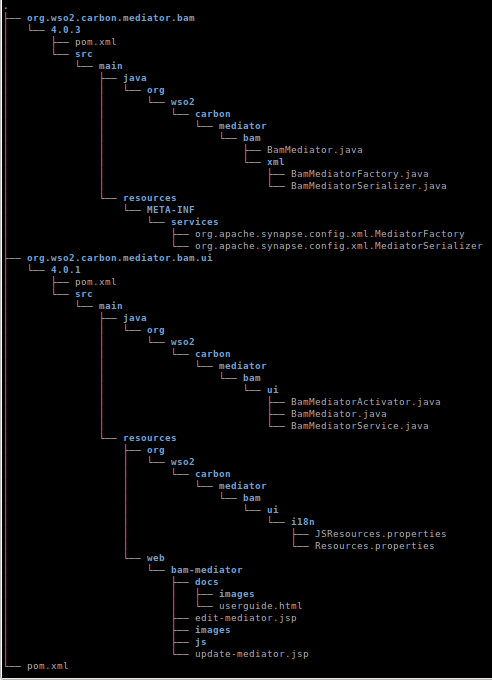
Below it is given the structure of the mediator component (BAM mediator is used as the example) in version, 4.0.3. (Only the relevant directories and files are mentioned) Note that the version of UI component used here is 4.0.1.


For purpose of selecting text, the above structure is given as text below.


.
├── org.wso2.carbon.mediator.bam
│   └── 4.0.3
│       ├── pom.xml
│       └── src
│           └── main
│               ├── java
│               │   └── org
│               │       └── wso2
│               │           └── carbon
│               │               └── mediator
│               │                   └── bam
│               │                       ├── BamMediator.java
│               │                       └── xml
│               │                           ├── BamMediatorFactory.java
│               │                           └── BamMediatorSerializer.java
│               └── resources
│                   └── META-INF
│                       └── services
│                           ├── org.apache.synapse.config.xml.MediatorFactory
│                           └── org.apache.synapse.config.xml.MediatorSerializer
├── org.wso2.carbon.mediator.bam.ui
│   └── 4.0.1
│       ├── pom.xml
│       └── src
│           └── main
│               ├── java
│               │   └── org
│               │       └── wso2
│               │           └── carbon
│               │               └── mediator
│               │                   └── bam
│               │                       └── ui
│               │                           ├── BamMediatorActivator.java
│               │                           ├── BamMediator.java
│               │                           └── BamMediatorService.java
│               └── resources
│                   ├── org
│                   │   └── wso2
│                   │       └── carbon
│                   │           └── mediator
│                   │               └── bam
│                   │                   └── ui
│                   │                       └── i18n
│                   │                           ├── JSResources.properties
│                   │                           └── Resources.properties
│                   └── web
│                       └── bam-mediator
│                           ├── docs
│                           │   ├── images
│                           │   └── userguide.html
│                           ├── edit-mediator.jsp
│                           ├── images
│                           ├── js
│                           └── update-mediator.jsp
└── pom.xml

As the post is going to continue further more let's discuss further on this topic in Part 2.

Latest JavaScript Visualization Libraries

These days JavaScript and HTML5 are becoming the most prominent open web based visualization technology. There are many jQuery libraries available with MIT Licences which is very free form of open source licences. Here I am going to introduce 3 such libraries.

  1. One of the latest JavaScript library was jqPlot which has a comprehensive set of visualization modules like, line charts and pie charts etc.
  2. The most popular JavaScript tool for web based graph creation (visualization of networks and flow charts) is jsPlumb that comes with MIT licences and plugs with many JavaScript frameworks like jQuery, MooTools, YUI3 and more. Also it supports SVG, Canvas and VML which is compatible with IE6 and later.
  3. The latest JavaScript library I came across is D3.js which has a number of  complex visualization components that were earlier possible only with Flash. The value is that it comes with BSD licences. There is no need to explain about D3. Visit the link and see how advance it is.

Wednesday, October 24, 2012

BAM Toolboxes

Why BAM Toolboxes ?

As mentioned in introduction to BAM WSO2 BAM consists of three main components named Data Receiver, Analyzer and Visualizer. These three components act independent as much as possible to,

  1. Reduce the complexity of the BAM,
  2. Enable to scale up the BAM independently in each component,
  3. And enable to plugin each component when enhancing the architecture.

In the end user's point of view, these three components are complex set of API's. Many of their functionality are suitable to make transparent to the end user. Manually configuring each of them according to the business requirement is quite difficult and takes a long learning curve. But due to the requirement of flexibility and extendability this complexity is unavoidable. The solution is BAM Toolboxes.
Developers of BAM are shipping a set of pre-configured examples as a single zip archive file with the extension, "tbox" which can be deployed in BAM easily. Although the rationale behind the concept "toolbox" is much broader, in current versions of BAM we are shipping only a set of examples, for some useful and popular use cases of BAM. The user can study the given toolboxes in a relative use case and adopt them according to their requirements. In future we expect to deliver a much generic type of toolboxes to achieve the requirements of the BAM toolboxes.

Toolbox Content

At the moment, a toolbox is basically a zip archive of,

  1. Stream Definitions
  2. Analytics
  3. And Visualization Components.
The user should specify each of the above contents accordingly compatible with each other. Let's understand what each of them are and how they are related to each main three components of BAM. This post only discusses about the theoretical aspects of BAM toolboxes. Implementation details can be found here.

Stream Definitions

A detailed description about the Stream Definition concept is given in an earlier post. A toolbox should include the set of stream definitions used in the toolbox. Actually including Stream Definitions in a toolbox is optional as even without Stream Definitions, the toolbox functions well. The Stream Definition was introduced to toolboxes, to avoid an exception printed in the console, when the Hive script is executed before the data is stored in the Cassandra. (i.e. Column family is created when the very first time the data is sent to the Cassandra database. When Hive query is trying to access an unavailable column family, the exception fires.) The syntax is similar to the syntax given in the post about Stream Definitions. Here is an example stream definition which is the real stream definition used in Activity Monitoring toolbox 2.0.1.

{
  'name': 'org.wso2.bam.activity.monitoring',
  'version': '1.0.0',
  'nickName': 'Activity_Monitoring',
  'description': 'A sample for Activity Monitoring',
  'metaData':[
          {'name':'character_set_encoding','type':'STRING'},
          {'name':'host','type':'STRING'},
          {'name':'http_method','type':'STRING'},
          {'name':'message_type','type':'STRING'},
          {'name':'remote_address','type':'STRING'},
          {'name':'remote_host','type':'STRING'},
          {'name':'service_prefix','type':'STRING'},
          {'name':'tenant_id','type':'INT'},
          {'name':'transport_in_url','type':'STRING'}
  ],
  'correlationData':[
          {'name':'bam_activity_id','type':'STRING'}
  ],
  'payloadData':[
          {'name':'SOAPBody','type':'STRING'},
          {'name':'SOAPHeader','type':'STRING'},
          {'name':'message_direction','type':'STRING'},
          {'name':'message_id','type':'STRING'},
          {'name':'operation_name','type':'STRING'},
          {'name':'service_name','type':'STRING'},
          {'name':'timestamp','type':'LONG'}
  ]
}

Analytics

The middle component of the BAM is the analyzer. The analyzer is basically a Hadoop analytics engine. As Hadoop codes are considered as a very primitive programming, Hive scripts are run on top of Hadoop. Therefore the programming part of analyzer is a set of Hive scripts. These Hive scripts can be scheduled so that the scripts are executed periodically in as given or they can be unscheduled and can be executed manually when required.
Roughly what should happen in a Hive script can be described as follows.
  1. Create Hive tables for Cassandra column families that contain data received from the Data Receiver. - This will create the metadata of Hive tables relevant to the real Cassandra column families.
  2. Create Hive tables for RDBMS tables. - This will create the metadata of Hive tables relevant to the real RDBMS tables that should contain processed result data.
  3. Create Hive tables for both Cassandra and RDBMS tables that should keep intermediately generated data. (This is optional)
  4. Process data from source Hive tables and overwrite result data in the result Hive tables. If required intermediate can be stored in intermediate Hive tables.
Hive language is similar to SQL and can be learnt from HIve tutorial. Usage of JDBC handlers in Hive script can be found from here. Here is an example Hive script written for the Activity Monitoring toolbox 2.0.1.

CREATE EXTERNAL TABLE IF NOT EXISTS ActivityDataTable
 (messageID STRING, sentTimestamp BIGINT, activityID STRING, version STRING, soapHeader STRING, soapBody STRING)
 STORED BY 'org.apache.hadoop.hive.cassandra.CassandraStorageHandler'
 WITH SERDEPROPERTIES (
  "cassandra.host" = "127.0.0.1" ,
 "cassandra.port" = "9160" ,
 "cassandra.ks.name" = "EVENT_KS" ,
 "cassandra.ks.username" = "admin" ,
 "cassandra.ks.password" = "admin" ,
 "cassandra.cf.name" = "org_wso2_bam_activity_monitoring" ,
 "cassandra.columns.mapping" =
 ":key, payload_timestamp, correlation_bam_activity_id, Version, payload_SOAPHeader, payload_SOAPBody" );

CREATE EXTERNAL TABLE IF NOT EXISTS ActivitySummaryTable(
 messageRowID STRING, sentTimestamp BIGINT, bamActivityID STRING, soapHeader STRING, soapBody STRING)
 STORED BY 'org.wso2.carbon.hadoop.hive.jdbc.storage.JDBCStorageHandler'
 TBLPROPERTIES (
 'mapred.jdbc.driver.class' = 'org.h2.Driver' ,
 'mapred.jdbc.url' = 'jdbc:h2:repository/database/samples/BAM_STATS_DB;AUTO_SERVER=TRUE' ,
 'mapred.jdbc.username' = 'wso2carbon' ,
 'mapred.jdbc.password' = 'wso2carbon' ,
 'hive.jdbc.update.on.duplicate' = 'true' ,
 'hive.jdbc.primary.key.fields' = 'messageRowID' ,
 'hive.jdbc.table.create.query' =
 'CREATE TABLE ActivitySummary (messageRowID VARCHAR(100) NOT NULL PRIMARY KEY,
  sentTimestamp BIGINT, bamActivityID VARCHAR(40), soapHeader TEXT, soapBody TEXT)' );

insert overwrite table ActivitySummaryTable
 select messageID, sentTimestamp, activityID, soapHeader, soapBody
 from ActivityDataTable
 where version= "1.0.0";

Visualization Components

Visualizing the processed data from the Analyzer is the duty of the Visualizer. Generic way of visualizing different types of data, with different types of user-UI interactions is the main requirement of the BAM Visualizer. As the other two main components of BAM, Visualizer too have to be configured by the user according to the requirement. So the complexity of configuration of Visualization should be easy while fulfilling the above main requirement.
At this stage of BAM (version 2.0.1), it is designed to visualize using two different ways that is suitable for two different requirements. (Excluding the report generation mechanism)

  1. Generate a Gadget and deploy it in a Dashboard (this is the same dashboard used in WSO2 Gadget Server) - This way of configuration is most suitable for non-technical (ordinary) users. It is a straightforward way of generating a gadget using the Gadget Wizard by just specifying the type of visualization component (e.g.: Bar Chart) and the relevant data sets to each axis. (e.g.: x-axis, y-axis) But this way of specifying a visualization component is poor in flexibility and user interactive quality in the UI.
  2. The other way of specifying a visualization component is by writing a custom dashboard with Jaggery. Jaggery is a server side JavaScript language which is capable of interacting with web services and Carbon data sources. I recommend to look into an existing custom dashboard if someone is interested on creating their own custom dashboard.
Generating reports is another major visualization feature available in BAM. I am not going to discuss about it in this post.

Overall content of a toolbox archive can be shown as below.


Friday, October 19, 2012

Stream Definitions

In this post I would like to explain more about WSO2 BAM 2.0. This blog post will be mainly focused about the concept of Data Streams used in WSO2 BAM and also in WSO2 CEP.

Introduction Data Streams

As mentioned in the previous post, Data Bridge is the generalized form of receiving data from an external data source and the generalized form of storing them to the secondary storage. In earlier versions of BAM it was tried to send data from external data source to the Data Receiver via different types of protocols. The problem was the lack of throughput achieved by them. BAM was expected to be used under the heavy load of data from high trafficked Enterprise Service Buses and web services. The scale of data was categorized as Big data due to its size and unstructured nature and need to be handled with a data transfer protocol scalable in throughput.
Earlier techniques that were used were mainly based on data protocols with key-value pair couples. And the data overhead of its container was a main concern. So the designers came up with the idea that if the types of data to be transferred is required to be known only at the beginning of the transmission there is no need to specify the types of data every time it is specified. In other words key-value pairs are redundant with information. And also they found if the data to be transmitted very frequently, in very small chunks, can be converted to a sequence of large packets, with aggregated data, transmitted periodically, the overhead can be significantly reduced. This way of thought brought them to the concept of Data Streams.
Data Streams is an implementation based on Apache Thrift which is a binary protocol that fulfills the above given requirements. With the performance tests performed they found that Thrift has the highest throughput within the available technologies suited for the given requirement. Some of implementation details of Data Streams in Data Agents can be found here. This will be discussed in detail in future.

Stream Concept

In this Stream concept the data sender has to agree on a set of data types it wish to send in an each data event. So when the first message is sent to the Data Receiver, the set of types of it wish to send, is sent with the message defining the Stream. This is known as the Stream Definition. Each Stream Definition is unique in the pair of Stream Name and the Stream Version. Stream Name corresponds to the Cassandra Column Family the stream of data to be stored. So when different stream definitions are required to be used to store several data streams into the same column family, different stream versions should be used with the same stream name corresponding to the column family. After the stream definition is sent once in each stream, the types of data transferring will not be mentioned in later messages sent to Data Receiver. Only the data values will be sent hereafter as chunks to the Data Receiver where the data is read as the given stream definition. Unlike in protocols like HTTP, where every data type is sent as string, in Thrift for each field the space allocated in each message is only the required number of bits. This is also an advantage related to a high throughput.

Stream Definition Example

Although a Data Stream can be defined using Java in code, there is another way of defining a Stream as a Java string with the format of a JSON object. For the ease of understanding the concept I am going to give a sample code defining a Stream Definition.


{
  'name': 'stream.name',
  'version': '1.0.0',
  'nickName': 'stream nick name',
  'description': 'description of the stream',
  'metaData':[
          {'name':'meta_data_1','type':'STRING'},
          {'name':'meta_data_2','type':'INT'}
  ],
  'correlationData':[
          {'name':'correlation_data_1','type':'STRING'},
          {'name':'correlation_data_2','type':'DOUBLE'}
  ],
  'payloadData':[
          {'name':'payload_data_1','type':'BOOL'},
          {'name':'payload_data_2','type':'LONG'}
  ]
}

The column family created for this stream will be "stream_name" in "EVENT_KS" by replacing dot (".") with an underscore ("_"). The default version should be "1.0.0" and it can be incremented when another stream is required to be added to the same Cassandra column family or if the existing stream is to be edited. The important thing to note here is that a stream cannot be deleted or edited at the moment but when required, another stream should be created with the same name but with a different version.
Here "metadata" corresponds to the meta information related to the stream. e.g.: character set encoding and message type. "correlationData" corresponds to the data required to correlate between different monitoring points such as the "activity ID" of a message flow. All other content related to the payload of the message such as SOAP header of the message, SOAP body of the message and properties intercepted from the message should be specified as "payloadData". Their type should be specified as the "type" in each field. Valid types are as follows.
  1. String
  2. Int
  3. Long
  4. Double
  5. Float
  6. Bool

This post is intended to get only the theoretical background in Stream Definitions used in WSO2 BAM 2.0. I hope to discuss coding in future posts.

Wednesday, October 17, 2012

WSO2 BAM 2.0 - Overview

Introduction to WSO2 BAM

WSO2 BAM is an open source (with Apache license version 2.0) business activity monitor developed on top of WSO2 Carbon framework 4.0. WSO2 introduced BAM for its products initially to monitor the statistics of WSO2 Enterprise Service Bus (ESB). But in BAM 2 the concept was broad and it acts as a server basically capable of capturing data from external source, process them and visualize them according to the requirement.
WSO2 BAM is not completely described by the definition of BAM describes previously. WSO2 provides two different solutions for monitoring data in real-time and periodically. Realtime data analysis is achieved from the WSO2 CEP Server which is capable of processing data in a little latency inside memory which based on Siddhi CEP engine. WSO2 BAM is used for analyzing data batch-wise which is using secondary storage stored data as the source and generate web based visualization user interfaces and reports based on analyzed data.
One of the main advantage of WSO2 BAM 2.0 is its inherent design to deal with scalability and extendability to achieve requirements of big data handling.

Overall Structure of WSO2 BAM

Mainly WSO2 BAM is defined with three major parts.
  1. Data Receiver
  2. Analyzer
  3. Visualizer

Data Receiver

All the data to be analyzed and visualized should be sent to the BAM via Data Receiver. Data receiver immediately store them in a Secondary storage. (Current implementation is a Cassandra big data database)
Data Receiver consists of a generic data collector component called "Data Bridge" which provides an generic data API to the external data sources. Current implementation supports Thrift protocol which is a fast binary protocol that runs on top of TCP and facilitates a very high throughput using some optimization techniques based on a concept called "Data Streams". And also Data Bridge provides a generic API for secondary storage which enables many types of external secondary storage systems to subscribe for data events. Current implementation of secondary storage is Cassandra as mentioned earlier. Therefore the Data Bridge interface of secondary storage is implemented by the "Cassandra Persistence Manager" that stores the data events pushed by the Data Bridge.

Analyzer

In WSO2 BAM, received data into the Cassandra database are used for processing inside the Analyzer. Data are processed as batch processes and processed data are stored into a secondary storage media. That secondary storage can either be an big data storage system or an RDMS storage system. Intermediately processed data are usually stored in a big data database and final results are usually stored in a RDMS database. This known as a Polyglot data architecture.
In current implementation Apache Hadoop engine is used as the processing engine and process queries are written on top of Apache Hive which is a SQL like language. Hive scripts are executed periodically on the given dataset as scheduled earlier.

Visualizer

The next part of the BAM is designed to visualize processed in two ways.
  1. In web based UI visualization elements
  2. Generate report documents
Report generation and UI visualization both are using the processed data produced by the Analyzer. In UI visualization, at present, we use both Jaggery based custom dashboards for identified specific usecases and WSO2 Gadget Server (GS) based gadgets. From the above two, generating GS based gadgets are facilitated with a Gadget Generation component in BAM, that enables even an ordinary user, to generate custom gadgets for their own usecases.

Secondary Storage

There mainly two types of secondary storage used in BAM.
  1. Big data databases
  2. RDMS databases
Cassandra is used as the big data database solution and MySQL is generally used as the RDMS solution. But in the BAM pack H2 embedded database is used as the default RDMS database.
RDMS databases are usually used for storing result datasets which are several orders smaller than the original dataset where original datasets are considered as big data datasets.

Data Agents

Data Agents are custom components designed for each data source. For example "BAM Mediator" and "Service Data Agent" are such data agents specifically designed for WSO2 ESB and WSO2 Application Server. (AS) Current API of Data Agent should implement the Data Bridge API to push data into Data Receiver. In other words Data Agents should communicate with the Data Receiver as Data Streams.

Lets discuss more deeper about WSO2 BAM 2.0 in next post.


Sunday, October 14, 2012

Introduction to BAM

As a quick introduction to BAM, lets briefly outline what is BAM and how they are used with their introductions.

Business Activity Monitoring (BAM) is a main concern for almost every enterprise software. BAM is used there to gather information from day-to-day activity via software used in an enterprise. Some of the main concerns are,
  1. Collect, analyze and visualize information related to transactions
  2. Evaluate business growth and underneath market patterns
  3. Identifying customer requirement patterns
  4. Stakeholder behavioral analysis in a business
  5. Detecting attacks on security systems
  6. Billing and metering services in cloud environment
  7. System failure alerting
and etc.

Meeting the all the above mentioned requirements with a single system is a very complex technological challenge which is not completely resolved. According to Gartner BAM is defined in a more general manner. There BAM is defined more as a real-time data analyzing system or as an analyzer of historical data and provide valuable results. Also it explains the use of BAM as a visualization tool and also as a software that can invoke some other system based on event driven manner.
BAM is considered also as a business feedback technology that identifies and analyzes the real trends in business and predict the future of a business. Therefore BAM can be a valuable tool that can gain a competitive advantage to a business as BAM can also be considered as a business intelligence software.
Detection and prevention of security attacks like DDOS attack is also an important usecase of BAM. Heart beating is another application of a BAM when considering the reliability of a system. Complex Business Processes are also required to be monitored to gather activity. One of the other use cases of BAM is to monitor system usage, service usage and etc to throttle tenants in a public or private cloud to guarantee the QoS of each tenant.