Showing posts with label ESB. Show all posts

Friday, August 23, 2019

From ESB to Ballerina

Introduction to Conventional ESB

The main slogan for ESB was the ability to configure a process flow models in Enterprise mediation scenarios without using a programming language. As majority of integration requirement scenarios (e.g.: Content Based Routing, Message Transformation) can be modeled with a set of XML tags, it was expected to be used by lay people to write their own business logic without any programming skill. This positioning is common to almost all ESBs currently available in the market like Oracle ESB, IBM Integration Bus and Mulesoft ESB.

How it was like The Real Marriage with Conventional ESBs?


Though it was believed to be useful to configure a XML for mediation, the content to be written was verbose and lengthy to configure. Once a problem is detected in a XML configuration it took much time to fix, as the process is involved with reading documentation and needed some trial-and-error configurations to come up with the correct configuration. As more and more configurable parameters were added to each of the XML component, the readability and the configurability was reduced significantly with the maturity of the ESB. Then the question was why a simple programming code would not be able to replace the lengthy XML configurations.
Another trend came up with time was the Micro Service Architecture. As the services are to be spread across several lightweight containers, the conventional ESBs faced the challenge of deploying artifacts with less up-time and with a less memory footprint. With the maturity of ESBs the code base was large and was consist of multiple layers of architecture that added less value compared to the cost involved. It was difficult to fulfill the lightweight requirement of the Microservice world with XML based SOAP mediation where REST and JSON became the mainstream.

Birth of Ballerina

WSO2 was thinking hard how to address the above issues with existing ESBs. Some proposed solutions were to develop a Java API for integration scenarios, replacing the XML configurations. However they have found that the flexibility given by an API would not be sufficient for some scenarios. And the acquisition of Java by a commercial organization introduced some fear of its existence in future as an opensource language where an API would tightly couple the integration with Java language. Another aspect was the unavoidable performance implication due to its inherent garbage collection where the modern integration is supposed to be so faster than data processing in convention.
The decision was to develop a programming language focused on integration, supporting cloud native capabilities by nature. Inspired by the programming based paradigm used for integration by Apache Camel, Ballerina was born. First version of the Ballerina language is running on Java Virtual Machine (JVM) which is known as JBallerina. Ballerina syntax is converted to the Java byte code which is running on top of JVM. This addressed most of the issues related to unavailability of libraries for Ballerina language, as Java library APIs can be wrapped with Ballerina, while providing the expected development environment for integration developers. Anyway, the future of the Ballerina is not limited to the JVM dependency. In future the there will be a language called nBallerina which would run on a different libraries and runtimes supporting heterogeneous language libraries.

My Programming Experience with Ballerina


At the moment I am involved in developing a Ballerina based integrator for WSO2 Enterprise Integrator (WSO2 EI). It will be the next generation of WSO2 Enterprise Integration, facilitating users to develop integration scenarios with Ballerina language. As the first step we are developing a set of Ballerina Connectors which are analogous to WSO2 ESB Connectors. There we develop connectors with Ballerina language 1.0.0 alpha. I have seen the XML based mediation used in similar cases where the development with Ballerina is much intuitive relative to them. With Ballerina I could easily use my programming knowledge in Java, JavaScript and Python as a transferable skill. It was far easier than I expected except some issues I faced with the VSCode development environment. VSCode plugin for Ballerina is under heavy development at the moment which is expected to solve most of the usability issues in it. In conventional Integration platforms which use XML as the configuration language (e.g.: Mulesoft, IBM Integration) are highly prone to errors when it comes to error handling and incompatibility across different mediators/connectors as the issues are not interactively communicated to the developer. That highly increase the development time compared to developing a general purpose code. Ballerina has correctly addressed that deficiency by making the error handling mandatory by design and providing code completion suggestions and snippet generation for commonly used scenarios. As Ballerina supports messages to be defined as types, many run time errors caused due to mismatch of message structures are avoided at the compiler phase.

Final Wrap up

With my previous experience developing in ESBs based on XML configurations I feel easier to develop with Ballerina for similar scenarios. I tried my best to convey my opinion on Ballerina minimizing my biases on Ballerina. I expect the enterprise integration paradigm based on configuration would be moved to simple programming based models like Ballerina in future.


Sunday, March 2, 2014

ESB Performance Round 7.5

WSO2 has carried out a performance testing of latest ESB release, WSO2 ESB 4.8.1. In WSO2 ESB Performance Round 7.5 it compares WSO2 ESB 4.8.1 with other competitive ESB products, Mule ESB 3.4.0, Talend-SE 5.3.1 and UltraESB 2.0.0.

Basic observations are as follows.


Monday, January 7, 2013

Writing a Custom Mediator for WSO2 ESB - Part 3

This is the last part of blog post series about creating a WSO2 ESB mediator. Older parts are,
  1. Part 1
  2. Part 2
In this post I will explain the UI component of a ESB mediator using the BAM mediator (Carbon version 4.0.5). UI component (i.e.: org.wso2.carbon.mediator.bam.ui) is responsible for the BAM mediator specific UIs in the following UI.

Mediator UI


When BAM mediator is selected in the above mediator sequence (there is only the BAM mediator is available here anyway) the UI located under the sequence UI, is specified in the mediator UI component. Anyway not all the UI under it comes from the UI component. UI between the bar named Mediator and Update button comes from the UI component. Actually this is the edit-mediator.jsp JSP located in the resources package in org.wso2.carbon.mediator.bam.ui component.
After the changes are made on UI the user can click on the above mentioned Update button. This event will call the update-mediator.jsp JSP adjacent to the edit-mediator.jsp JSP.

When switch to source view is clicked the following source appears.


And you can return back to design view by clicking on switch to design view link. This toggling mechanism need the implementation of UI component. In simple terms this functionality need the implementation of,
  1. BamMediator UI class - similar to BamMediator class in backend component
  2. serialize method - similar to serializeSpecificMediator method in BamMediatorSerializer class in backend component
  3. build method - similar to createSpecificMediator method in BamMediatorFactory class in backend component

Abstract Mediator Class (UI)


The difference of UI component with backend component is, that both serialize method and build method are included in the BamMediator UI class. BamMediator UI class can be found in org.wso2.carbon.mediator.bam.ui package.
BamMediator class should inherit from org.wso2.carbon.mediator.service.ui.AbstractMediator.
And also it should implement getTagLocalName method, similar to getTagQName used in backend. And also the serialize and build methods as mentioned earlier should be implemented.

public class BamMediator extends AbstractMediator {

    public String getTagLocalName() {

    }

    public OMElement serialize(OMElement parent) {

    }

    public void build(OMElement omElement) {

    }

}

Abstract Mediator Service Class


Every mediator UI component should consists of a Mediator Service class. In this example BamMediatorService is the class which implements the required settings of the UI. Let's explain with the example.

public class BamMediatorService extends AbstractMediatorService {

    public String getTagLocalName() {
        return "bam";
    }

    public String getDisplayName() {
        return "BAM";
    }

    public String getLogicalName() {
        return "BamMediator";
    }

    public String getGroupName() {
        return "Agent";
    }

    public Mediator getMediator() {
        return new BamMediator();
    }

}

As the example says every Mediator Service should inherit the org.wso2.carbon.mediator.service.AbstractMediatorService class.
Note how the name BAM is used as the sequence editor under the sub menu item named Agent. See how the getMediator method is used to execute the BamMediator UI class which we have discussed earlier.

Bundle Activator Class


Unlike other Carbon bundles where Bundle Activator is defined in the backend bundle, in a mediator class, the Bundle Activator is defined in the  UI bundle. In this example it is BamMediatorActivator class.

Basically the Bundle Activator should inherit the org.osgi.framework.BundleActivator class and should implement start and stop methods. For further information read this article.

Properties props = new Properties();

bundleContext.registerService(MediatorService.class.getName(), new BamMediatorService(), props);

Note how the BamMediatorService class is used.

Congratulations, you have finished the post series of how to write a custom mediator with WSO2 ESB. If you could not understand this well, most probably that is because you are not familiar with WSO2 Carbon platform. If you search more you will be able to catch them.

Friday, January 4, 2013

Writing a Custom Mediator for WSO2 ESB - Part 2

Let's continue from the previous post, Part 1. As there were several changes and fixes happened to BAM mediator, there we are taking the example of two latest components,
  1. org.wso2.carbon.mediator.bam version 4.0.5 - backend component
  2. org.wso2.carbon.mediator.bam.ui version 4.0.5 - UI component
As you can see, there is no services.xml file exists in the backend component. There are two files namely org.apache.synapse.config.xml.MediatorFactory and org.apache.synapse.config.xml.MediatorSerializer containing the class names (with package name) of Mediator Factory and Mediator Serializer. Let's discuss the usage of these 2 classes.

Mediator Factory


In WSO2 ESB, each mediator is created using the Factory design pattern. When the ESB starts each mediator is created using a Mediator Factory. The programmer is given the opportunity to write the Mediator Factory as a single class. In this example, the factory class is org.wso2.carbon.mediator.bam.xml.BamMediatorFactory that contains all the instantiating code relevant to the mediator. Factory class is the code that generates the mediator based on the mediator XML (XML specification of the mediator in the ESB sequence). In this factory the configuration information should be extracted from the XML and should create a mediator based on that configuration.

public Mediator createSpecificMediator(OMElement omElement, Properties properties) {

}

This method should be implemented which takes the XML as an OMElement and returns the Mediator to be produced. Here it is an instance of the BamMediator class we have defined in the parent package.
And also in this method it can access the secondary storage (e.g.: Registry) as the method is not performance critical. (This method will run only at the creation stage of a mediator.)

public QName getTagQName() {

}

This method should also be implemented to return the QName of the XML of the specific mediator. In BAM mediator it has the name "bam".

Mediator Serializer

Mediator Serializer does the reverse of the Mediator Factory. It creates the XML, related to the mediator, back from the Mediator class. (Here it is from BamMediator)

public OMElement serializeSpecificMediator(Mediator mediator) {

}

This method should implement which does the above said conversion. (serialization) It takes the Mediator and returns the generated XML, related to the mediator.

public String getMediatorClassName() {

}

And also this should be implemented to return the Mediator's class name.

Now let's start discuss about the most important class, the Mediator class, here the BamMediator class.

Mediator Class

This is the class used while the ESB is running for the purpose of mediation. As this class is executed in run time it should be designed with care avoiding unnecessary performance degrading actions. And also because this class is executed in parallel threads, should be careful on concurrency issues and make them thread safe.
Mediator class should always extend the AbstractMediator class.

public boolean isContentAware() {
    return true;
}


The above method must be included in the Mediator class if the mediator is intended to interact with the MessageContext.
mediate is the most important method that should be implemented.


public boolean mediate(MessageContext messageContext) {

}

mediate method is given the MessageContext of the message, which is unique to an each request passing through the mediation sequence. The return boolean value should be true if the mediator was successfully executed and false if not.

Note that global variables in the Mediator class may cause race condition as different threads of the mediation sequence may access the same global variable. It can be prevented by one of the following techniques.
  1. Using local variables inside the method
  2. Storing variables in the MessageContext as Properties
  3. Using thread local variables
Best way to handle this issue is possible with first technique if the mediator is not that complex. And the third technique should be used with care if want to use due to the risk of memory leaks.

Let's discuss about the UI package in the next part (Part 3).

Wednesday, November 7, 2012

Writing a Custom Mediator for WSO2 ESB - Part 1

Not another "How to Write a Class Mediator"

This blog post discusses how to write a genuine/real Mediator for WSO2 ESB. This is not another article on writing a Class Mediator based on the content from Oxygen Tank articles,
  1. Writing a Mediator in WSO2 ESB - Part 1 and
  2. Writing a Mediator in WSO2 ESB - Part 2 .
Although the above mentioned content is very popular in web, I could not find any article describing how to write a real ESB mediator for WSO2 ESB. This post describes how to create a real ESB mediator.

Difference between a genuine/real mediator vs a Class mediator

In WSO2 ESB you can find mediators like Log Mediator, Clone Mediator, Cache Mediator, Property Mediator and etc. Class mediator is a similar mediator comes ready with the WSO2 ESB. Class mediator is a special mediator that provides an API to a novel programmer to implement his/her custom code as a mediator in side the WSO2 ESB. Above mentioned articles describes how to create a mediator using a Class mediator. But, a Class mediator may not give you the full power of a WSO2 ESB mediator. It will not be shown in the mediator menu that contains the other mediators and will not be able to easily configurable using the UI as other first class citizen mediators. Class mediators cannot extract parameters from the XML exists in the mediator XML as a first class mediator. There may be some other restrictions as well that I have not gone through.

Why this post is important ?

So if you are really interested on creating your own mediator with all the privileges consumed by other mediators in the ESB, you have to create your own mediator as described in this post. I am going to explain the knowledge I gathered while I was designing and implementing the BAM Mediator. I referred the implementation of Smooks Mediator as a reference to a custom mediator. You too can follow either Smooks Mediator or BAM Mediator as the reference mediator if required. The reason is that the implementation of UI bundles and backend bundles are implemented in different places in other available mediators. In those mediators, although the UI components are implemented as WSO2 components, their backends are located inside the dependencies -> Synapse location.

Code and Background

Start Coding

First you have to checkout the WSO2 Carbon source code from the trunk/branch/tag as required. Then you have to build it with Maven 3. Now you can add your custom mediator as a Carbon Component into the correct location. In my case this is the location for the BAM Mediator. (i.e. : BAM Mediator is located in here and Smooks Mediator located in here.) The advantage of using this location is that you can inherit all the required Mevan dependencies from the parents. From here onward for explanation purpose I will use BAM mediator as the example mediator.

Code Locations

Basically you can create the mediator component in /components/mediators/ and you can include all the UI bundles and backend bundles inside your mediator directory /components/mediators/bam. Then you have to go to the Carbon mediators feature in /features/mediators/ and create the mediator feature as /features/mediators/bam-mediator/ in a suitable feature name. Then you can build the p2-repo feature of your feature by adding your feature into the pom.xml in /features/repository/ and building the p2-repo.

Pre-requisite Knowledge

Before you go through this blog you need to have a knowledge on how to work with WSO2 Carbon framework. Basically you need to know how to create a Carbon Component, create a Carbon feature and install a feature to a WSO2 Carbon server. This webinar will be a useful one for learning.
And also being familiar with Apache Mevan 3 and OSGI is required. No need to say about Java :) . It is a must.

Writing the Mediator

Bundles Used

Let's start to create the mediator. First you need to know the usage of UI bundles and backend bundles in a mediator. Mainly there should be at least a one main UI bundle and a one main backend bundle to build a mediator component.

  • Main UI bundle - Adds the UI functionality to be used in the Design Sequence view as shown below. In BAM mediator org.wso2.carbon.mediator.bam.ui is the main UI bundle.

Shows the mediator in the mediator menu

Mediator configuration is allowed via UI under the mediator menu

  • Main backend bundle - Is responsible for all the mediation related backend processing. In BAM mediator the main backend bundle is org.wso2.carbon.mediator.bam .
There can be more UI bundles (e.g. : org.wso2.carbon.mediator.bam.config.ui) and backend bundles (e.g. : org.wso2.carbon.mediator.bam.config) created for helping the main bundles.

Structure of Main Bundles

As WSO2 ESB is allowing the programmer to add their custom mediator as pluggable components to the ESB, most of the UI functionality and mediator functionality required to interact with the rest of the ESB is made transparent to the programmer. In other words the programmer have to program only what he/she really wants from the mediator but not how to plug the component into the ESB. This is one of a sign of the good architecture of WSO2 ESB. It is intelligent enough to identify the Java class by its name and location in the component and refer them appropriately in the ESB. The programmer only need to implement the classes and the rest will be done by the ESB internally. Due to that reason, the user does not have to (and should not) implement a Service Stub to access the main backend bundle from the main UI bundle.
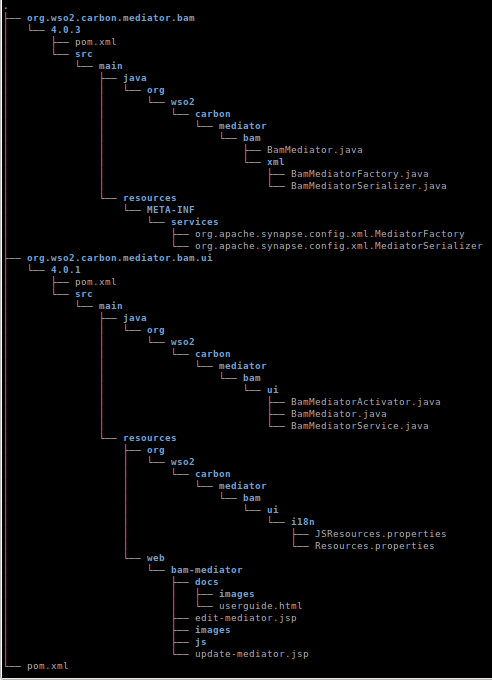
Below it is given the structure of the mediator component (BAM mediator is used as the example) in version, 4.0.3. (Only the relevant directories and files are mentioned) Note that the version of UI component used here is 4.0.1.


For purpose of selecting text, the above structure is given as text below.


.
├── org.wso2.carbon.mediator.bam
│   └── 4.0.3
│       ├── pom.xml
│       └── src
│           └── main
│               ├── java
│               │   └── org
│               │       └── wso2
│               │           └── carbon
│               │               └── mediator
│               │                   └── bam
│               │                       ├── BamMediator.java
│               │                       └── xml
│               │                           ├── BamMediatorFactory.java
│               │                           └── BamMediatorSerializer.java
│               └── resources
│                   └── META-INF
│                       └── services
│                           ├── org.apache.synapse.config.xml.MediatorFactory
│                           └── org.apache.synapse.config.xml.MediatorSerializer
├── org.wso2.carbon.mediator.bam.ui
│   └── 4.0.1
│       ├── pom.xml
│       └── src
│           └── main
│               ├── java
│               │   └── org
│               │       └── wso2
│               │           └── carbon
│               │               └── mediator
│               │                   └── bam
│               │                       └── ui
│               │                           ├── BamMediatorActivator.java
│               │                           ├── BamMediator.java
│               │                           └── BamMediatorService.java
│               └── resources
│                   ├── org
│                   │   └── wso2
│                   │       └── carbon
│                   │           └── mediator
│                   │               └── bam
│                   │                   └── ui
│                   │                       └── i18n
│                   │                           ├── JSResources.properties
│                   │                           └── Resources.properties
│                   └── web
│                       └── bam-mediator
│                           ├── docs
│                           │   ├── images
│                           │   └── userguide.html
│                           ├── edit-mediator.jsp
│                           ├── images
│                           ├── js
│                           └── update-mediator.jsp
└── pom.xml

As the post is going to continue further more let's discuss further on this topic in Part 2.